Magazine Blogger Templates

"Free Blogger Templates"

Nov 10, 2009

Guzel Magazine Blogger Template

Guzel Magazine Blogger Template
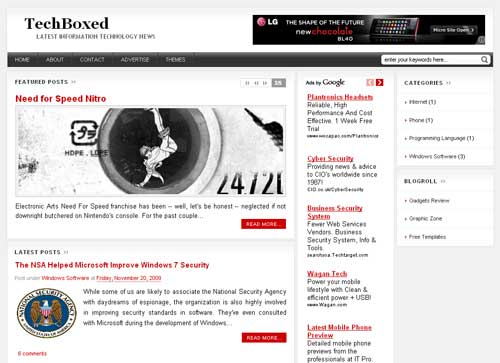
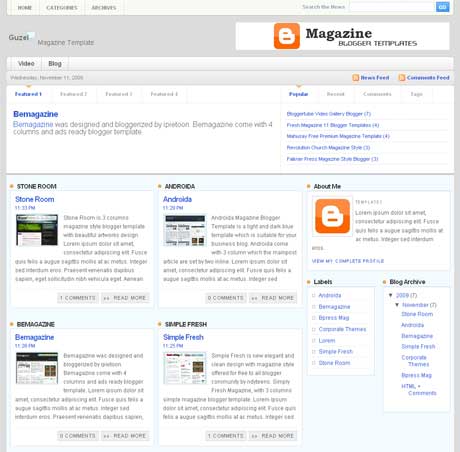
Guzel Magazine is new blogger template designed by Custom Theme Design for wordpress and Bloggerized by Free Blogger Template. this template come with 4 columns and right sidebar with simple colour, white and blue. There is a lot of place to put your widget or banner advertisement. Guzel magazine is a new free premium magazine template for blogger user.

Basic Installation

Top Navigation
goto Edit HTML and Find code below in your template.

<div id='topleft'>
<ul id='pagenavigation'>
<li class='page_item'><a href='/'>Home</a></li>
<li class='page_item'><a href='#'>Categories</a>
<ul>
<li class='page_item'><a href='#'>SUB MENU</a></li>
</ul>
</li>

<li class='page_item'><a href='#'>Archives</a>
<ul>
<li class='page_item'><a href='#'>SUB MENU</a></li>
</ul>
</li>
</ul>
</div>

Change blue code to your url and red code to your title url.

Middle Navigations
goto Edit HTML and Find code below in your template.
<div id='menux'>
<ul id='dmenu'>
<li class='cat-item'><a href='http://www.youtube.com'>Video</a>
<ul class='children'>
<li class='cat-item'><a href='http://www.youtube.com'>YouTube</a></li>

<li class='cat-item'><a href='http://www.metacafe.com'>Metacafe</a></li>
<li class='cat-item'><a href='http://www.dailymotion.com'>DailyMotion</a></li>
</ul>
</li>
<li class='cat-item'><a href='http://www.blogger.com'>Blog</a>
<ul class='children'>
<li class='cat-item'><a href='http://www.blogger.com'>Blogger</a></li>
<li class='cat-item'><a href='http://www.wordpress.com'>Wordpress</a></li>
</ul>
</li>
</ul>
</div>

Change blue code to your url and red code to your title url.

Post Feature
Post Feature
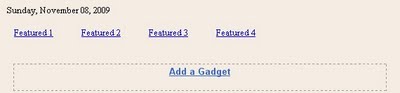
1. Click "Featured1/Featured2/Featured3/Featured4"
2. Add a Widget => html/javascript
3. Place your post Title in "Title Box" and yout post summary in "Content Box"
4. Save

Right Featured box
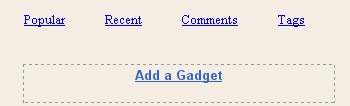
Right Featured box
same way with step 3.
==> popular post widget
Add a Widget => html/javascript => put code below on it.
<script type="text/javascript">
function pipeCallback(obj) {
document.write('<ul style="text-transform: capitalize;">');
var i;
for (i = 0; i < obj.count ; i++)
{
var href = "'" + obj.value.items[i].link + "'";
var item = "<li>" + "<a href=" + href + ">" + obj.value.items[i].title + "</a> </li>";
document.write(item);
}
document.write('</ul>');
}
</script>
<script src="http://pipes.yahoo.com/pipes/pipe.run?_render=json&_callback=pipeCallback&_id=a7d3195528df5e96181a3d2712266226&url=http%3A%2F%2FYOURBLOGNAME.blogspot.com&num=5" type="text/javascript"></script>

Change the red code to your own blog url.
==> Recent Post widget
Add a Widget => Feed => input your blog/post feed url
Example : http://yourblogmane.blogspot.com/feeds/posts/default
==> Recent Comment widget
Add a Widget => Feed => input your comments feed url
Example : http://yourblogmane.blogspot.com/feeds/comments/default
==> Post Tags widget
Add a Widget => Labels => and choose tags cloud labels.

All done happy downloading.

Preview | Download

Nov 6, 2009

ADT Home Security System for Your Safety

Nowadays, People are feeling more and more vulnerable in homes, neighborhoods, cities, and even our country.. People feel an added sense of comfort when their house is protected with a dependable device, and often times the device does not even have to be activated in order for people to feel safer. But with mass competition between Home Security System provider, you probably frustated to choose the best and trusted company. homesecurityteam come to answer your calls.

ADT is the number one of the best company out there to provide you with easy to use home system. ADT home security provide the fastest response when you need a help or get some problems. ADT Home Security Making your residence secure against intruders today. When your alarm is activated you will expect an immediate help from their customer service. They are ready for you 24/7 a week and 365 day's a year.

A lot of security firms demand a high fee for advanced systems, however ADT home security offers great value for the price. Your Security System and Safety is ADT Top Priority. Included in ADT alarms, wireless sensors and advanced security features will be installed in your home and you'll get the TOP service and keep you away from the intruders. I really recommended ADT for your Home Security System.

Nov 4, 2009

Stone Room Magazine Blogger Template

Stone Room Magazine Blogger Template

Stone Room is 3 columns magazine style blogger template with beautiful artworks design converted from wordpress theme by led24.de to blogger by BloggerTemplateplace. The most unique feature of Stone Room Magazine Blogger Templates is Unique Navigation Linktabbed to 2 columns.

Basic Installation

Date Format Setting
goto Layout > Page Elements > edit Blog Posts > change time format to long date (e.g Tuesday, June 23, 2009).
Remember, change time format NOT date format.

Twitter Widget
Find Code below in your template :

<script src='http://twitter.com/statuses/user_timeline/MagTemplates.json?callback=twitterCallback2&amp;count=2' type='text/javascript'/>

Change the red code to your own twitter user ID
Feedburner Setting
Find Code below in your template :
<a href='http://feeds2.feedburner.com/MagBlogger'><img alt='' height='26' src='http://feeds2.feedburner.com/~fc/MagBlogger?bg=FD6D00&amp;fg=202931&amp;anim=1' style='border:0' width='88'/></a>

Change the red code to your own feedburner user ID
Slider Content Widget
Put Code below in HTML/Javascript widget below your header Section.
<li class="s3sliderImage">
<a href="Your Post Link"><img alt="Post Image" width="546px" src="Your Image Link" height="200px"/></a>
<span>
<a class="featured-title block" href="Your Post Link" rel="bookmark" title="Your Post Title">Title Here</a><br/>
</span>
</li>

<li class="s3sliderImage">
<a href="Your Post Link"><img alt="Post Image" width="546px" src="Your Image Link" height="200px"/></a>
<span>
<a class="featured-title block" href="Your Post Link" rel="bookmark" title="Your Post Title">Title Here</a><br/>
</span>
</li>

Change the red code to your own links and titles and image url.

Navigation Link

Find Code below in your template :
<div class='headmenuslot' onmouseout='A_color(2)' onmouseover='A_color(1)'><div class='punkt' onMouseOut='outPunkt(this);' onMouseOver='overPunkt(this);'><div class='titleamenu'><a ID='AW' href='Your Main Link'>Your Title</a></div><div class='list_punkts'>

<div class='list_punkts_top'/>
<div class='kont'>
<table border='0' cellpadding='0' cellspacing='0' class='tabmenu' width='100%'>
<tr>
<td width='50%'><a href='Your Link Here'>Title</a><br/><p>Short Description about this Item</p></td>
</tr>
<tr>
<td width='50%'><a href='Your Link Here'>Title</a><br/><p>Short Description about this Item</p></td>
</tr></table>
<div class='clear'/>
</div>
<div class='list_punkts_bot'/>
</div></div></div>

Change the red code to your own. youll find 4 code like that so you must change all of it.

Description below Navigation Links

Find this code below in your template :
<div class='heabootmenu'>
<div class='heabootmenu_des'>
However, most Wordpress themes are either used too often...</div>
<div class='heabootmenu_des'>
However, most Wordpress themes are either used too often...</div>

<div class='heabootmenu_des'>
However, most Wordpress themes are either used too often...</div>
<div class='heabootmenu_des'>
However, most Wordpress themes are either used too often...</div>
</div>

Change the description. The format should be like this below :
<div class='heabootmenu_des'>
Your Description Go here...
</div>

All done happy downloading.

Preview | Download

Oct 30, 2009

Hybrid Gallery Magazine Blogger Template

Hybrid Gallery Magazine Blogger Template

Hybrid Gallery Magazine Blogger Template was originally designed by be-insight for bloggers community. Hybrid Gallery is 3 columns blogger template with left sidebar and gallery style, new layout, very attractive magazine style. It also embedded with all new blogger feature and 3 columns in footer section make it even better. Hybrid Gallery suitable for wallpaper or css gallery blog.

All Feature
- Blockquote custom
- Footer with 3 columns
- Space for banner 125x125 in the sidebar (see tutorial at the end of post)
- tyle gallery
- Menu already installed and editable only in the insertion of new links (see tutorial at the end of post)
- Search-SCC custom next to the menu;
- Works perfectly in the latest versions of all browsers, (IE does not support CSS3)
- Using CSS3 for rounded edges, drop shadow effect in the title, description, links, menu, area post on the main page, the titles of the Sidebar and the Footer of the blog. Unfortunately these effects are not displayed in IE;
- Links to share on social networks already installed.

Basic Installation

Navbar Menu
Find code below in your template and edit the Titles and URL

<li> <a title='Home' expr:href='data:blog.homepageUrl'>Home</a></li>
<li><a title='About' href='URL_HERE'>About</a></li>
<li><a title='Contact' href='URL_HERE'>Contact</a></li>
<li><a title='Edit' href='URL_HERE'>Edit</a></li>

125x125 Ads Setting
Find code below in your template and change the ads with your own.
<ul id='advertise'>
<li><a href='#'><img src='http://lh4.ggpht.com/_dKIQkAGa2xA/Sth-EyzIcGI/AAAAAAAAAWA/J-7jr_AX7CA/advertisement.jpg'/></a></li>
</ul>

Format should be like below :
<li><a href='URL HERE'><img src='IMAGE HERE'/></a></li>

All done enjoy the blogger magazine template.

Preview | Download

Oct 29, 2009

BlogArtZine Magazine Blogger Template

BlogArtZine Magazine Blogger Template

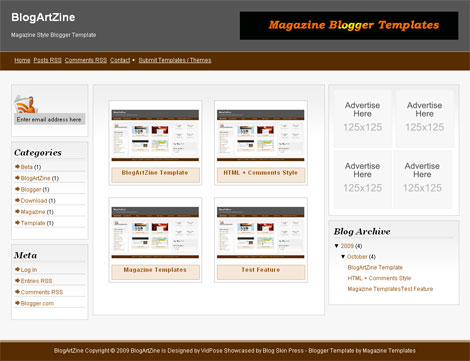
BlogArtZine is another magazine style blogger template for blogspot users bloggerized by BlogSkinPress. BlogArtZine Magazine Blogger Template Released with 4 columns, with 2 column center main post body side by side. This template suitable for CSS gallery blog or wallpapers blogs. The minor things from it just the colour style is'nt that great. But you can edit it manually. I do some edit with this template, also included avatar enabled in comments section.

Basic Installation

Navbar Menu
Find code below in your template

<li><a href='#'>Home</a></li>
<li><a href='#'>Posts RSS</a></li>
<li><a href='#'>Comments RSS</a></li>
<li><a href='#'>Contact</a></li>
<li>+</li>
<li><a href='#'>Submit Templates / Themes</a></li>

Change the "#" with your own URL and Chage the title to whatever you want.

Feedburner Setting
Find Code below in your template :
<div id='feeds'>
<form action='http://feedburner.google.com/fb/a/mailverify' id='feedform' method='post' onsubmit='window.open(&apos;http://feedburner.google.com/fb/a/mailverify?uri=YOUR-FEEDBURNER-ID&apos;, &apos;popupwindow&apos;, &apos;scrollbars=yes,width=550,height=520&apos;);return true' target='popupwindow'>
<input class='textarea' name='email' onblur='if (this.value == &apos;&apos;) {this.value = &apos;Enter email address here&apos;;}' onfocus='if (this.value == &apos;Enter email address here&apos;) {this.value = &apos;&apos;;}' type='text' value='Enter email address here'/><br/>
<input name='uri' type='hidden' value='camelgraph'/> <input name='title' type='hidden' value='54800'/> <input name='loc' type='hidden' value='en_US'/>
</form>
<a href='http://feeds2.feedburner.com/YOUR-FEEDBURNER-ID'><img alt='' height='26' src='http://feeds2.feedburner.com/~fc/YOUR-FEEDBURNER-ID?bg=5eb7c3&amp;fg=ffffff&amp;anim=1' style='border:0' width='88'/></a>
</div>

Change YOUR-FEEDBURNER-ID with your own ID
125x125 Ads Setting
Find Code below and change it with your own ads banner
<div id='adspot'>
<!-- Ad1 start -->
<a class='ad1' href='#'><img src='http://4.bp.blogspot.com/_nxOMLf2KJwU/Sai5_XgYzxI/AAAAAAAABG4/Da1niOQL0Uw/s1600/advertise%2B125x125.png'/></a>
<!-- Ad2 start -->
<a class='ad1' href='#'><img src='http://4.bp.blogspot.com/_nxOMLf2KJwU/Sai5_XgYzxI/AAAAAAAABG4/Da1niOQL0Uw/s1600/advertise%2B125x125.png'/></a>
<!-- Ad3 start -->
<a class='ad1' href='#'><img src='http://4.bp.blogspot.com/_nxOMLf2KJwU/Sai5_XgYzxI/AAAAAAAABG4/Da1niOQL0Uw/s1600/advertise%2B125x125.png'/></a>
<!-- Ad4 start -->
<a class='ad1' href='#'><img src='http://4.bp.blogspot.com/_nxOMLf2KJwU/Sai5_XgYzxI/AAAAAAAABG4/Da1niOQL0Uw/s1600/advertise%2B125x125.png'/></a>
<div class='clearer'/>
</div>

All done feel free to download it and enjoy the template. you can also help me to spread the worlds about Magazine Blogger Templates with twitter on top. Enjoy.

Preview | Download

Oct 26, 2009

Androida Magazine Blogger Template

Androida Magazine Blogger Template

Androida Magazine Blogger Template is a light and dark blue template which is suitable for your business blog. Androida come with 3 column which the mainpost article are set by two inline, the post area is divided with two column. Androida was designed By Jinsona Design and bloggerized By Cahayabiru.com.

Basic Installation

Feed Burner ID Form
Go to Layout – Edit HTML – no need to expand widget template
Find This Word:

CahayaBirusSphere

Change it with your own Feedburner ID.

Menu Navigation
Add code below to javascript menu widget
<li><a href='#'>Title Here</a></li>

Remember to change
"#" with your own url
"Title Here" with your title

125x125 Banners
Edit sponsor widget and put code below.
<li><a href="Target link Here" rel="bookmark" title=""><img alt="" style="vertical-align:bottom;" src="Image Link Here"/></a></li>

Edit the red code.
Done and Enjoy Androida Magazine Blogger Template

Preview | Download

Oct 23, 2009

Simple Fresh Magazine Blogger Template

Simple Fresh Magazine Blogger Template

Simple Fresh is new elegant and clean design with magazine style offered for free to all blogger community by ndyteens. Simply Fresh Magazine, with 3 columns simple magazine blogger template. This template is built ads ready with 125x125 banner ads widget. Suitable for business blog. Simply Fresh is fully widgetized so you can put more widget to your template. Simple fresh is supported by new blogger feature such us Embedded Comments form, Avatar comments, and new read more or "Jump-Link" for blogger.

Basic Installation

Header 468x60 Ads
Find code below :

<a href='#'><img src='http://4.bp.blogspot.com/_GxuemnBfQlA/ShecM96zAaI/AAAAAAAAAF4/BBYd5-k-Wt4/s320/topbanner.gif' style='width: 468px; height: 60px;'/></a>

Change it with your own ads banner or you can put your adsense, adbrite or another advertising netwotk.

Navigation menu
Find this code:
<div id='menu'>
<div id='main_menu'><ul>
<li class='current'><a expr:href='data:blog.homepageUrl'>Home</a></li>
<li><a expr:href='data:blog.homepageUrl + &quot;feeds/posts/default&quot;'>Posts RSS</a></li>
<li><a expr:href='data:blog.homepageUrl + &quot;feeds/comments/default&quot;'>Comments RSS</a></li>
<li><a href='#'>Edit</a></li></ul>
</div>

Replace the link with yours

Subcribe Setting
Edit Subscribe widget and put code below on it.
Get Update From <b>Magazine Templates</b> On your email!
<p></p><form id="subscribe" action="http://feedburner.google.com/fb/a/mailverify" target="popupwindow" method="post" onsubmit="window.open('http://feedburner.google.com/fb/a/mailverify?uri=Your_Feed_Url', 'popupwindow', 'scrollbars=yes,width=550,height=520');return true"><input id="subbox" onfocus="if (this.value == 'Enter Your Email...') {this.value = '';}" value="Enter Your Email..." name="email" onblur="if (this.value == '') {this.value = 'Enter Your Email...';}" type="text"/><input value="Your_Feed_Url" name="uri" type="hidden"/><input value="" name="loc" type="hidden"/><input id="subbutton" value="GO" type="submit"/></form>
<br/>
<p><a href="http://feeds.feedburner.com/Your_Feed_Url"><img width="88" style="border:0" alt="" src="http://feeds.feedburner.com/~fc/Your_Feed_Url?bg=CC0000&amp;fg=444444&amp;anim=1" height="26"/></a></p>

Change Your_Feed_Url with your own feedburner id.

Sponsored Banner
Edit Sponsored Widget and put code below on it.
<center>
<!-- Ad1 start -->
<a class="ad1" href="#"><img src="http://4.bp.blogspot.com/_sunpK_FtO1E/SmLcNLRnB4I/AAAAAAAAAI8/T31xo25DqCQ/s1600/themeforest.jpg"/></a>
<!-- Ad2 start -->
<a class="ad2" href="#"><img src="http://4.bp.blogspot.com/_sunpK_FtO1E/SmLcNLRnB4I/AAAAAAAAAI8/T31xo25DqCQ/s1600/themeforest.jpg"/></a>
<!-- Ad3 start -->
<a class="ad3" href="#"><img src="http://4.bp.blogspot.com/_sunpK_FtO1E/SmLcNLRnB4I/AAAAAAAAAI8/T31xo25DqCQ/s1600/themeforest.jpg"/></a>
<!-- Ad4 start -->
<a class="ad4" href="#"><img src="http://4.bp.blogspot.com/_sunpK_FtO1E/SmLcNLRnB4I/AAAAAAAAAI8/T31xo25DqCQ/s1600/themeforest.jpg"/></a>
<div class="clearer"></div></center>

Please Change Image url and your link destination.

Done and enjoy.
Preview | Download