Magazine Blogger Templates

"Free Blogger Templates"

Jun 6, 2009

Fresh Magazine 1.1 Blogger Templates

New magazine style blogger template, released by NdyTeeN. It's another mind blowing magazine style blogger templates with simple colour. Just white and red. Featured slide show on top. This is 2 columns blogger template with right sidebar. Ads placement also included. Check the demo for live show.


Installation For Fresh Magazine 1.1 Blogger Templates
1. Basic Installation

2. Setting Header Images.



The PSD images doesn't included in the download file. You must make your header image with photoshop or other similiar image editor program. The image size must be 468 width x 107 height. Now upload it to your header from your blogger dashboard.
get it?

3. Setting up the Advertisement Banner



Go to Your Dashborad >> Layout >> Edit HTML >> Expand Widget Templates.
Now find this code :
<div class='headerright'>

<a href='#'><img src='https://blogger.googleusercontent.com/img/b/R29vZ2xl/AVvXsEjZAiVFWye0uWmdyRnxe6-dN_Gqz-rLteJqKFPxw1wU3PsDFZ9cqe4BJDLsLPc09xVahjuY7MdEr-OhVGA9rCPaD8picK0nFUv3nXvcXwkMY3Zx8ax9DMgRoLZbDKLVW_0soUNn92PAHm8/s320/topbanner.gif' style='width: 468px; height: 60px;'/></a>

</div>


Now Change the red text to your own banner or maybe google adsense code.

3. Setting Up the Top Tab Menu Navigation

Find code below in your template.
<div id='NavbarMenuleft'>
<ul id='nav'>
<li><a expr:href='data:blog.homepageUrl'>Home</a></li>
<li>
<a href='#'>Sample Page</a>
<ul>
<li>
<a href='#'>Sub Page #1</a>
<ul>
<li><a href='#'>Sub Sub Page #1</a></li>
<li><a href='#'>Sub Sub Page #2</a></li>
<li><a href='#'>Sub Sub Page #3</a></li>
</ul>
</li>
<li><a href='#'>Sub Page #2</a></li>
<li><a href='#'>Sub Page #3</a></li>
<li><a href='#'>Sub Page #4</a></li>
<li><a href='#'>Sub Page #5</a></li>
</ul>
</li>
<li><a href='#'>Sample Post</a></li>
<li><a href='#'>Blog Page</a></li>
</ul>
</div>


Now Change it with your own.

4. Setting Navigation menu just below top tabs

Go to Your Dashborad >> Layout >> Edit HTML >> Expand Widget Templates.
Find Code below.
<div id='subnavbar'>
<ul id='subnav'>
<li>
<a href='#'>Community Events</a>
<ul>
<li>
<a href='#'>Sub Category #1</a>
<ul>
<li>
<a href='#'>Sub Sub Category #1</a>
</li>
<li>
<a href='#'>Sub Sub Category #2</a>
</li>
<li>
<a href='#'>Sub Sub Category #3</a>
</li>
</ul>
</li>
<li>
<a href='#'>Sub Category #2</a>
</li>
<li>
<a href='#'>Sub Category #3</a>
</li>
</ul>
</li>
<li>
<a href='#'>Conferences</a>
</li>
<li>
<a href='#'>Get Connected</a>
</li>
</ul>
</div>


That's the code now change it with your own.

5. Setting The slide show.

Go to Your Dashborad >> Layout >> Edit HTML >> Expand Widget Templates.
Find Code below.
<div class='slide'>
<h2><a href='POST-LINK-HERE' title='Superbowl'>Superbowl</a></h2>
<span class='slmet'> Posted by NdyTeeN On Mei - 25 - 2009 </span>
<p>Lorem ipsum dolor sit amet, consectetuer adipiscing elit. Quisque sed felis. Aliquam sit amet felis. Mauris semper, velit semper laoreet dictum, quam diam dictum urna, nec placerat elit nisl in quam. Etiam augue pede, molestie eget, rhoncus at, convallis ut, eros. Aliquam pharetra. Nulla in tellus eget odio sagittis blandit. Maecenas at nisl. Nullam lorem mi, eleifend a, fringilla vel, semper at, ligula. Mauris eu wisi. Ut ante dui, aliquet nec, congue non, accumsan sit amet, lectus. Mauris et mauris. ...</p>
<img alt='' src='http://web2feel.com/monezine/wp-content/uploads/2008/12/stad.jpg'/>
</div>


Now You just see 5 code like that. Change it with your own. The format is below.
<div class='slide'>
<h2><a href='POST-LINK-HERE' title='Your Title'>Title</a></h2>
<span class='slmet'> Posted by </span>
<p>Your Summary Text. ...</p>
<img alt='' src='Your Image Url'/>
</div>


It's all done. Still have another problem? Then contact the author or you can ask me below and i'll try to solve your problem. Happy Blogging.

Jun 5, 2009

Falkner Press Magazine Style blogger template

Falkner Press Blogger Template

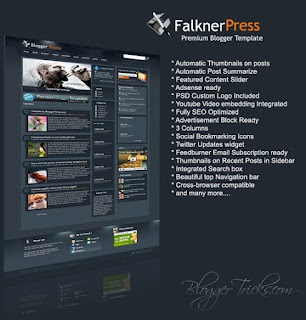
Another Magazine Style blogger template has been released by bloggertricks. Falkner Press Blogger Template was converted from a wordpress theme designed by CamelGraph. It's magazine style blogger template. Falkner Press has 3 columns with 2 right sidebar and much of feature is built in.

Feature :
* Auto Readmore
* Adsense Ready
* Featured Content Slideshow
* Social Bookmarking Icons
* Twitter Updates widget
* And Many more..


1. Basic Installation
2. Installation

Apr 28, 2009

Revolution Lifestyle Blogger Template Magazine Style Blogger Template


This is converted from Wordpress theme and the designer of the original Wordpress Theme is Brian Gardner and bloggerized by bloganol. This Template is also same like the Revolution Crunch Blogger Template.


Installation For Revolution Lifestyle Blogger Template
1. Basic Installation
2. The Rest

Apr 23, 2009

Revolution Church Magazine Style Blogger Template

Revolution Church Magazine Style Blogger Template

Revolution Church Magazine Style Blogger Template is a magazine style wordpress theme designed by Brian Gardner and converted to blogger by bloganol. Revolution Church is 3 column and optimized for advertising.
Features :

1. 3 column with right Sidebar.
2. Optimized for advertising. 4+ perfect areas for advertising.
3. built-In site-search Engine.
4. date widget at Top left that shows the current date.
5. 2 CSS Menus.
6. Magazine style template and Professional look.


Installation For Revolution Church Magazine Style Blogger Template
1. Basic Installation
2. Header Navigation Link
find the following code and edit with your own link.
<div id='NavbarMenuleft'>
<ul id='nav'>
<li><a expr:href='data:blog.homepageUrl'>Home</a></li>
<li>
<a href='#'>Sample Page</a>
<ul>
<li>
<a href='#'>Sub Page #1</a>
<ul>
<li><a href='#'>Sub Sub Page #1</a></li>
<li><a href='#'>Sub Sub Page #2</a></li>
<li><a href='#'>Sub Sub Page #3</a></li>
</ul>
</li>
<li><a href='#'>Sub Page #2</a></li>
<li><a href='#'>Sub Page #3</a></li>
<li><a href='#'>Sub Page #4</a></li>
<li><a href='#'>Sub Page #5</a></li>
</ul>
</li>
<li><a href='#'>Sample Post</a></li>
<li><a href='#'>Blog Page</a></li>
</ul>
</div>

3. Sub Menu Header Configuration
find the following code and edit with your own link. Or you can use your adsense link unit here.
<div id='subnavbar'>
<ul id='subnav'>
<li>
<a href='#'>Community Events</a>
<ul>
<li>
<a href='#'>Sub Category #1</a>
<ul>
<li>
<a href='#'>Sub Sub Category #1</a>
</li>
<li>
<a href='#'>Sub Sub Category #2</a>
</li>
<li>
<a href='#'>Sub Sub Category #3</a>
</li>
</ul>
</li>
<li>
<a href='#'>Sub Category #2</a>
</li>
<li>
<a href='#'>Sub Category #3</a>
</li>
</ul>
</li>
<li>
<a href='#'>Conferences</a>
</li>
<li>
<a href='#'>Get Connected</a>
</li>
</ul>
</div>

4. Adsense 468x60 Header Banner
Find this code and change it with your own banner or google adsense code.
<div class='headerright'>
Your Adsense Code Here
</div>

5. Adsertising banner below every post
Find code below and change it your own advertising link or you can delete it.
<div class='gapad'>
Your Adsense Code Here/Or you can Delete it.
</div>

6. It's done. Smile +_+. Remember google adsense just allow you to put 3 Adsense units and 3 link units on each page. Cheers.

Apr 18, 2009

Brownline Magazine Style Blogger Template

Brownline Magazine Style Blogger Template

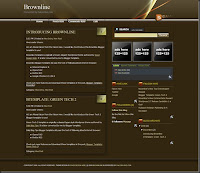
Designed and bloggerized by falconhive, new magazine style blogger template released for free to all of you. Brownline has 3 column with right sidebar. The are advertising box on top of righ sidebar.

Feature :
* 3 Column
* Advertising box supported
* Embed search Form.
* Navigation link


1. Basic Installation
2. Next Installation

Happy Blogging.

Apr 15, 2009

Revolution Theme Magazine Style Blogger Template

Revolution Theme Magazine Style Blogger Template

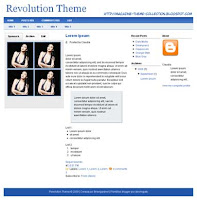
Here is today magazine blogger template. It's called Revolution Theme. Designed By Brian Gardner and bloggerized by Aborregate. It's 4 columns blogger template with right and left sidebar. Blue and white make it really good looking. 2 Navigation bar on top has been added. There's 4 ads banner place on the left sidebar.

Feature :
* Magazine Style
* 4 Columns
* 4 ads Banner Slot For Your Advertising.
* Navigation Link


Basic Installation

Enjoy.

Apr 14, 2009

Magasin Cuatro New Magazine Style Blogger Template

White, Blue, And Black Magazine template for blogger has been released by falconhive. It's really professional blogger template. Original design by Padd IT Solutions. a 3 column blogger template with right sidebar, featured content on the top menu., navigation link. Now we all know that's blogger can setup the very high quality template.

Feature :
* 728x15 Adsense ads Link Unit On Top
* Top Navigation Link
* Adsense Banner 468x60 On Top
* Feature Content Supported On Top
* 125x125 advertising banner on the sidebar.
* 3 Column With Right Sidebar
* Twitter Updates section


1. Basic Installation

Enjoy The New Style.
Technorati Profile