Magazine Blogger Templates

"Free Blogger Templates"

Showing posts with label Elegant. Show all posts

Nov 4, 2009

Stone Room Magazine Blogger Template

Stone Room Magazine Blogger Template

Stone Room is 3 columns magazine style blogger template with beautiful artworks design converted from wordpress theme by led24.de to blogger by BloggerTemplateplace. The most unique feature of Stone Room Magazine Blogger Templates is Unique Navigation Linktabbed to 2 columns.

Basic Installation

Date Format Setting
goto Layout > Page Elements > edit Blog Posts > change time format to long date (e.g Tuesday, June 23, 2009).
Remember, change time format NOT date format.

Twitter Widget
Find Code below in your template :

<script src='http://twitter.com/statuses/user_timeline/MagTemplates.json?callback=twitterCallback2&amp;count=2' type='text/javascript'/>

Change the red code to your own twitter user ID
Feedburner Setting
Find Code below in your template :
<a href='http://feeds2.feedburner.com/MagBlogger'><img alt='' height='26' src='http://feeds2.feedburner.com/~fc/MagBlogger?bg=FD6D00&amp;fg=202931&amp;anim=1' style='border:0' width='88'/></a>

Change the red code to your own feedburner user ID
Slider Content Widget
Put Code below in HTML/Javascript widget below your header Section.
<li class="s3sliderImage">
<a href="Your Post Link"><img alt="Post Image" width="546px" src="Your Image Link" height="200px"/></a>
<span>
<a class="featured-title block" href="Your Post Link" rel="bookmark" title="Your Post Title">Title Here</a><br/>
</span>
</li>

<li class="s3sliderImage">
<a href="Your Post Link"><img alt="Post Image" width="546px" src="Your Image Link" height="200px"/></a>
<span>
<a class="featured-title block" href="Your Post Link" rel="bookmark" title="Your Post Title">Title Here</a><br/>
</span>
</li>

Change the red code to your own links and titles and image url.

Navigation Link

Find Code below in your template :
<div class='headmenuslot' onmouseout='A_color(2)' onmouseover='A_color(1)'><div class='punkt' onMouseOut='outPunkt(this);' onMouseOver='overPunkt(this);'><div class='titleamenu'><a ID='AW' href='Your Main Link'>Your Title</a></div><div class='list_punkts'>

<div class='list_punkts_top'/>
<div class='kont'>
<table border='0' cellpadding='0' cellspacing='0' class='tabmenu' width='100%'>
<tr>
<td width='50%'><a href='Your Link Here'>Title</a><br/><p>Short Description about this Item</p></td>
</tr>
<tr>
<td width='50%'><a href='Your Link Here'>Title</a><br/><p>Short Description about this Item</p></td>
</tr></table>
<div class='clear'/>
</div>
<div class='list_punkts_bot'/>
</div></div></div>

Change the red code to your own. youll find 4 code like that so you must change all of it.

Description below Navigation Links

Find this code below in your template :
<div class='heabootmenu'>
<div class='heabootmenu_des'>
However, most Wordpress themes are either used too often...</div>
<div class='heabootmenu_des'>
However, most Wordpress themes are either used too often...</div>

<div class='heabootmenu_des'>
However, most Wordpress themes are either used too often...</div>
<div class='heabootmenu_des'>
However, most Wordpress themes are either used too often...</div>
</div>

Change the description. The format should be like this below :
<div class='heabootmenu_des'>
Your Description Go here...
</div>

All done happy downloading.

Preview | Download

Oct 23, 2009

Simple Fresh Magazine Blogger Template

Simple Fresh Magazine Blogger Template

Simple Fresh is new elegant and clean design with magazine style offered for free to all blogger community by ndyteens. Simply Fresh Magazine, with 3 columns simple magazine blogger template. This template is built ads ready with 125x125 banner ads widget. Suitable for business blog. Simply Fresh is fully widgetized so you can put more widget to your template. Simple fresh is supported by new blogger feature such us Embedded Comments form, Avatar comments, and new read more or "Jump-Link" for blogger.

Basic Installation

Header 468x60 Ads
Find code below :

<a href='#'><img src='https://blogger.googleusercontent.com/img/b/R29vZ2xl/AVvXsEjZAiVFWye0uWmdyRnxe6-dN_Gqz-rLteJqKFPxw1wU3PsDFZ9cqe4BJDLsLPc09xVahjuY7MdEr-OhVGA9rCPaD8picK0nFUv3nXvcXwkMY3Zx8ax9DMgRoLZbDKLVW_0soUNn92PAHm8/s320/topbanner.gif' style='width: 468px; height: 60px;'/></a>

Change it with your own ads banner or you can put your adsense, adbrite or another advertising netwotk.

Navigation menu
Find this code:
<div id='menu'>
<div id='main_menu'><ul>
<li class='current'><a expr:href='data:blog.homepageUrl'>Home</a></li>
<li><a expr:href='data:blog.homepageUrl + &quot;feeds/posts/default&quot;'>Posts RSS</a></li>
<li><a expr:href='data:blog.homepageUrl + &quot;feeds/comments/default&quot;'>Comments RSS</a></li>
<li><a href='#'>Edit</a></li></ul>
</div>

Replace the link with yours

Subcribe Setting
Edit Subscribe widget and put code below on it.
Get Update From <b>Magazine Templates</b> On your email!
<p></p><form id="subscribe" action="http://feedburner.google.com/fb/a/mailverify" target="popupwindow" method="post" onsubmit="window.open('http://feedburner.google.com/fb/a/mailverify?uri=Your_Feed_Url', 'popupwindow', 'scrollbars=yes,width=550,height=520');return true"><input id="subbox" onfocus="if (this.value == 'Enter Your Email...') {this.value = '';}" value="Enter Your Email..." name="email" onblur="if (this.value == '') {this.value = 'Enter Your Email...';}" type="text"/><input value="Your_Feed_Url" name="uri" type="hidden"/><input value="" name="loc" type="hidden"/><input id="subbutton" value="GO" type="submit"/></form>
<br/>
<p><a href="http://feeds.feedburner.com/Your_Feed_Url"><img width="88" style="border:0" alt="" src="http://feeds.feedburner.com/~fc/Your_Feed_Url?bg=CC0000&amp;fg=444444&amp;anim=1" height="26"/></a></p>

Change Your_Feed_Url with your own feedburner id.

Sponsored Banner
Edit Sponsored Widget and put code below on it.
<center>
<!-- Ad1 start -->
<a class="ad1" href="#"><img src="https://blogger.googleusercontent.com/img/b/R29vZ2xl/AVvXsEiiwfG_GtPKgCd4jAZW_1RG_aQ-PbFlQtXPT6d_vfejYy5oUEZ5gMYmLXcZK5GA65iYUmBRFBnghOaWLeEdxc0W8Z45pbP3aGrqp_p6tiBwKuSC6DLH73wSR1y-BwOaIfH3FSVvrlFvTp7l/s1600/themeforest.jpg"/></a>
<!-- Ad2 start -->
<a class="ad2" href="#"><img src="https://blogger.googleusercontent.com/img/b/R29vZ2xl/AVvXsEiiwfG_GtPKgCd4jAZW_1RG_aQ-PbFlQtXPT6d_vfejYy5oUEZ5gMYmLXcZK5GA65iYUmBRFBnghOaWLeEdxc0W8Z45pbP3aGrqp_p6tiBwKuSC6DLH73wSR1y-BwOaIfH3FSVvrlFvTp7l/s1600/themeforest.jpg"/></a>
<!-- Ad3 start -->
<a class="ad3" href="#"><img src="https://blogger.googleusercontent.com/img/b/R29vZ2xl/AVvXsEiiwfG_GtPKgCd4jAZW_1RG_aQ-PbFlQtXPT6d_vfejYy5oUEZ5gMYmLXcZK5GA65iYUmBRFBnghOaWLeEdxc0W8Z45pbP3aGrqp_p6tiBwKuSC6DLH73wSR1y-BwOaIfH3FSVvrlFvTp7l/s1600/themeforest.jpg"/></a>
<!-- Ad4 start -->
<a class="ad4" href="#"><img src="https://blogger.googleusercontent.com/img/b/R29vZ2xl/AVvXsEiiwfG_GtPKgCd4jAZW_1RG_aQ-PbFlQtXPT6d_vfejYy5oUEZ5gMYmLXcZK5GA65iYUmBRFBnghOaWLeEdxc0W8Z45pbP3aGrqp_p6tiBwKuSC6DLH73wSR1y-BwOaIfH3FSVvrlFvTp7l/s1600/themeforest.jpg"/></a>
<div class="clearer"></div></center>

Please Change Image url and your link destination.

Done and enjoy.
Preview | Download

Sep 25, 2009

BloggerTube Video Gallery Blogger Template

BloggerTube Video Gallery Blogger Template
BloggerTube is the first blogger template using automatic thumbnail for video, easy post for newbie, well made design and all of that, bloggertube is FREE. BloggerTube Blogger Template was designed and bloggerized by Dante Araujo.

Features on BloggerTube :

1. Automatic embedded video on post page (only paste URL link)
2. Automatic slider for the last featured videos
3. Automatic Recent videos widget (video thumbnail)
4. Automatic Thumbnail from Youtube (only Youtube URL)
5. Page Navigation
6. Three Column Video Posts

Basic Installation

How to post a new video on BloggerTube :

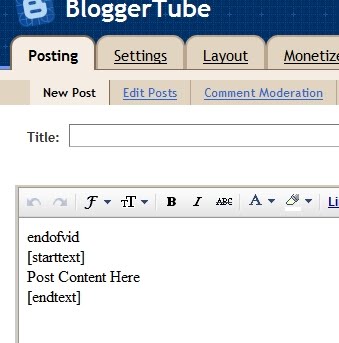
1. Go to setting >> Formatting >> Post Template and paste code below on the form and save it.

endofvid
[starttext]
Write anything here, upload pictures... Make a video description, whatever...
[endtext]


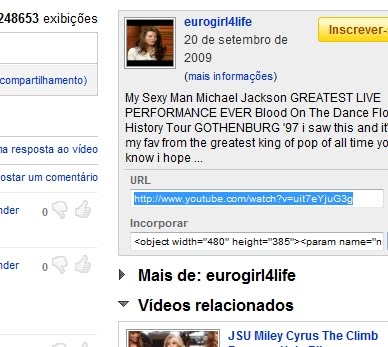
2. Go to youtube video and copy your youtube video url. Look closely to image below

Bloggertube Installation Image
3. Go to your Blogger and make your new post.


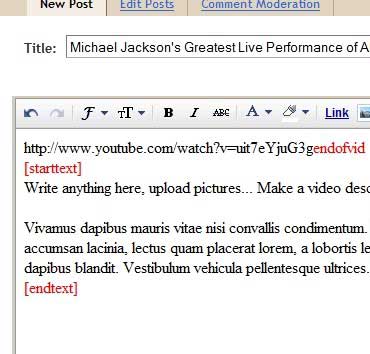
4. Your Post Should be format like this below :


5. Here is Your Post Format looks like
Your Youtube Video URLendofvid
[starttext]
Your Text description. Fill it Or leave it blank.
[endtext]


6. Install Recent Video Widget :
Just go to your Page Elements section, click to edit the HTML/Javascript Widget called "Recent Videos" and paste the following code inside:
<script style="text/javascript" src="http://blogergadgets.googlecode.com/files/dante.js"></script>
<script style="text/javascript">
var numposts = 5;
var showpostthumbnails = true;
var displaymore = true;
var displayseparator = true;
var showcommentnum = true;
var showpostdate = true;
var showpostsummary = true;
var numchars = 50;
</script>
<script src="/feeds/posts/default?orderby=published&alt=json-in-script&callback=showrecentpostswiththumbs"></script>
<div class="clear"/></div>

All done. Everything is automatic way. You just need to follow the instruction above. Look Demo below and happy download.

Preview | Download

Sep 19, 2009

Gallery Style Magazine Blogger Template

Gallery Style Magazine Blogger Template

Gallery template come with 4 columns (3 columns main body with one columns right sidebar). blogger template designed and bloggerized by Bloggerthemes called Gallery released for free and Just like the name, Gallery Blogger template is perfect for your CSS showcase blog or wallpaper blog. The color is dark style. Thanks to bloggerthemes.

Preview | Download

Basic Installation

Sep 11, 2009

Jynxed Unique Design Blogger Template

Jynxed is a unique template originally designed for wordpress theme by forthelose and has been converted to blogger by wpbloggerthemes. Jynxed has Unique web 2.0 feel. Jynxed template come with 2 columns and right sidebar. just Take a look to the demo to see the it live.

Jynxed Unique design Blogger Template

Preview | Download

Go here for your Basic Installation of blogger template.

Sep 3, 2009

Zin Folio Light Blue Magazine Template

Zin Folio is Light Blue Magazine Template designed by Jinsona Design and has been bloggerized by CahayaBiru.com. Zin Folio is three column template with built in special feature. Zin Folio is a magazine style which equipped with Image and Text Slider, Feedburner Form, Menu Bar, and Inline Small News. Zin Folio come with 2 columns right sidebar. Try this new high quality template for free.

Zin Folio Light Blue Magazine Template

Preview | Download

1. Basic Installation

Customize The Logo
Go to Layout – Edit HTML and find code below

https://blogger.googleusercontent.com/img/b/R29vZ2xl/AVvXsEgPFda_-3ATr-Xdn7kej34GeVnYf_Q0QEZ3ID-U02hofDuHrfIx4wXKaeVqq51maNaZKYRaEzbfsyrZQBgPEZ8MwQzj_hBVx0EO29buosdr38pJ9eIX_mNk6sd-Nnk9yCryu5OUy-Fghg/s400/logo.png

Change it with your own. The PSD files has been included in the download file.

Setting Feed Burner ID Form
Go to Layout – Edit HTML and find cobe below
CahayaBirusSphere

Change it with your own feedburner id

Customize The Menu
Find code below in your template and change it again with your own.
<li><a href='#'>Title Here</a></li>


Install The Javascript
Upload the Javascript (JS) file in JS foloder to your own webhosting. After that, find this : JAVASCRIPT-HOSTING-LINK-LOCATION in your template.
Change it with your own js link. Example :
<script src="JAVASCRIPT-HOSTING-LINK-LOCATION/slider.js" type="text/javascript"/>

To be like this below :
<script src="http://fileave.com/cahayabiru/slider.js" type="text/javascript"/>


Customize Image and text slider
Please go to link below :
http://www.cahayabiru.com/2009/08/image-and-text-slider_30.html


Customize Small News
Please go to link below :
http://www.cahayabiru.com/2009/08/small-news.html


All done. Enjoy new template.

Jul 18, 2009

Mahusay Free Premium Magazine Template

Mahusay Free Premium Magazine Template

Mahusay is originally free premium Wordpress Theme create by Paddsolutions and has been converted to blogger by Free Blogger Template. This theme come with 2 column Magazine style, elegant design, slide feature, and 2 element under post. Slideshow Post Feature are automatic update from your latest post.

Preview | Download

1. Basic Installation

Instalations Guide :

Go to "Edit HTML"
Find The Code below and replace the red/blue code with your own

Javascript Hosting
Find this code and replace with your own host.

<script src='http://WWW.YOUROWNHOSTING.COM/mootools.v1.11.js' type='text/javascript'/>
<script src='http://WWW.YOUROWNHOSTING.COM/jd.gallery.js' type='text/javascript'/>


Twitter Url
Find This Code and replace the red text with your Twitter Url
<a href='http://twitter.com/YOURNAME' id='twitter' title='Twitter'>Twitter</a>


Menu Navigation
Change it with your own.
<ul>
<li class='current_page_item'><a href='/'><span><span>Home</span></span></a></li>
<li class='page_item page-item-39'><a href='#' title='About'><span><span>About</span></span></a></li>
<li class='page_item page-item-28'><a href='#' title='Child Page'><span><span>Child Page</span></span></a></li>
</ul>


Slide Feature with automatic post update
change the red url with your Blog Url and blue Url with your Image Url(background image = 606x225 pixel).
<div class='imageElement'>
<h2>&lt;script&gt;var startposts = 0; numposts = 1; var showposttitle = true; showpostdate = false; var showpostsummary = false; var numchars = 0; &lt;/script&gt;&lt;script src=&quot;http://mahusay-fbt.blogspot.com/feeds/posts/default?orderby=published&amp;alt=json-in-script&amp;callback=rp&quot;&gt;
&lt;/script&gt;</h2>
<p>&lt;script&gt;var startposts = 0; numposts = 1; var showposttitle = false; showpostdate = false; var showpostsummary = true; var numchars = 150; &lt;/script&gt;&lt;script src=&quot;http://mahusay-fbt.blogspot.com/feeds/posts/default?orderby=published&amp;alt=json-in-script&amp;callback=rp&quot;&gt;
&lt;/script&gt;</p>
<a class='open' href='#' title='Read More'/>
<img class='full' src='http://i606.photobucket.com/albums/tt142/freebloggertemplate/mahusay/image1.jpg'/>
<img class='thumbnail' src='http://i606.photobucket.com/albums/tt142/freebloggertemplate/mahusay/image1.jpg'/>
</div>
<div class='imageElement'>
<h2>&lt;script&gt;var startposts = 1; numposts = 2; var showposttitle = true; showpostdate = false; var showpostsummary = false; var numchars = 0; &lt;/script&gt;&lt;script src=&quot;http://mahusay-fbt.blogspot.com/feeds/posts/default?orderby=published&amp;alt=json-in-script&amp;callback=rp&quot;&gt;
&lt;/script&gt;</h2>
<p>&lt;script&gt;var startposts = 1; numposts = 2; var showposttitle = false; showpostdate = false; var showpostsummary = true; var numchars = 150; &lt;/script&gt;&lt;script src=&quot;http://mahusay-fbt.blogspot.com/feeds/posts/default?orderby=published&amp;alt=json-in-script&amp;callback=rp&quot;&gt;
&lt;/script&gt;</p>

<a class='open' href='#' title='Read More'/>
<img class='full' src='http://i606.photobucket.com/albums/tt142/freebloggertemplate/mahusay/image2.jpg'/>
<img class='thumbnail' src='http://i606.photobucket.com/albums/tt142/freebloggertemplate/mahusay/image2.jpg'/>
</div>
<div class='imageElement'>
<h2>&lt;script&gt;var startposts = 2; numposts = 3; var showposttitle = true; showpostdate = false; var showpostsummary = false; var numchars = 0; &lt;/script&gt;&lt;script src=&quot;http://mahusay-fbt.blogspot.com/feeds/posts/default?orderby=published&amp;alt=json-in-script&amp;callback=rp&quot;&gt;
&lt;/script&gt;</h2>
<p>&lt;script&gt;var startposts = 2; numposts = 3; var showposttitle = false; showpostdate = false; var showpostsummary = true; var numchars = 150; &lt;/script&gt;&lt;script src=&quot;http://mahusay-fbt.blogspot.com/feeds/posts/default?orderby=published&amp;alt=json-in-script&amp;callback=rp&quot;&gt;
&lt;/script&gt;</p>
<a class='open' href='#' title='Read More'/>

<img class='full' src='http://i606.photobucket.com/albums/tt142/freebloggertemplate/mahusay/image3.jpg'/>
<img class='thumbnail' src='http://i606.photobucket.com/albums/tt142/freebloggertemplate/mahusay/image3.jpg'/>
</div>
<div class='imageElement'>
<h2>&lt;script&gt;var startposts = 3; numposts = 4; var showposttitle = true; showpostdate = false; var showpostsummary = false; var numchars = 0; &lt;/script&gt;&lt;script src=&quot;http://mahusay-fbt.blogspot.com/feeds/posts/default?orderby=published&amp;alt=json-in-script&amp;callback=rp&quot;&gt;
&lt;/script&gt;</h2>
<p>&lt;script&gt;var startposts = 3; numposts = 4; var showposttitle = false; showpostdate = false; var showpostsummary = true; var numchars = 150; &lt;/script&gt;&lt;script src=&quot;http://mahusay-fbt.blogspot.com/feeds/posts/default?orderby=published&amp;alt=json-in-script&amp;callback=rp&quot;&gt;
&lt;/script&gt;</p>
<a class='open' href='#' title='Read More'/>
<img class='full' src='http://i606.photobucket.com/albums/tt142/freebloggertemplate/mahusay/image1.jpg'/>
<img class='thumbnail' src='http://i606.photobucket.com/albums/tt142/freebloggertemplate/mahusay/image1.jpg'/>
</div>
<div class='imageElement'>
<h2>&lt;script&gt;var startposts = 4; numposts = 5; var showposttitle = true; showpostdate = false; var showpostsummary = false; var numchars = 0; &lt;/script&gt;&lt;script src=&quot;http://mahusay-fbt.blogspot.com/feeds/posts/default?orderby=published&amp;alt=json-in-script&amp;callback=rp&quot;&gt;
&lt;/script&gt;</h2>
<p>&lt;script&gt;var startposts = 4; numposts = 5; var showposttitle = false; showpostdate = false; var showpostsummary = true; var numchars = 150; &lt;/script&gt;&lt;script src=&quot;http://mahusay-fbt.blogspot.com/feeds/posts/default?orderby=published&amp;alt=json-in-script&amp;callback=rp&quot;&gt;
&lt;/script&gt;</p>

<a class='open' href='#' title='Read More'/>
<img class='full' src='http://i606.photobucket.com/albums/tt142/freebloggertemplate/mahusay/image2.jpg'/>
<img class='thumbnail' src='http://i606.photobucket.com/albums/tt142/freebloggertemplate/mahusay/image2.jpg'/>
</div>


Feedburner Subscriber
<input name='url' type='hidden' value='http://feeds.feedburner.com/~e?ffid=YOURFEEDBURNERID'/>


Enjoy and thanks to Free Blogger Template for converting this great template.

Jun 26, 2009

Milano Blogger Template

Milano Blogger Template

Milano Blogger Template is originally a wordpress theme designed by Web2Feel and has been converted to blogger by Falcon Hive. Feature Included: Unique and professional layout design, Welcome Message section, Featured Content section, Top navigation menu, Second navigation menu, JavaScript-based tabber, 300×250 Ads gadget, 125×125 Ads gadget, 2 sidebar section, Fully widgetized

Preview | Download

Jun 25, 2009

Conservative American Blogger Templates

Conservative American Blogger Templates

Conservative American Blogger Templates is coverted by Zonacerebral from wordpress American Conservative theme designed by Jeremy Buff. It's 2 columns with dark background template.

The feature :

* 2 Columns
* Black
* Elegant
* Rounded corners
* White
* Twitter widgwts
* Slide Show

Preview | Download

Jun 24, 2009

Dreamy Blogger Templates

Dreamy Blogger Templates

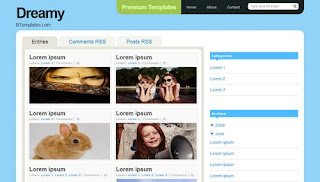
Dreamy Blogger Templates is a simple gallery style blogger template, organized, eye-candy, blue, and minimalistic. The good feature is automatic summary of your posts, and automatic thumbnail of post images as well. Dreamy Blogger Templates has been bloggerized by Dante.

Features:

* Gallery Style
* Cool Navigation Bar
* Organized
* Blue
* Custom comments, Blockquotes and Lists
* Automatic Thumbnail
* Automatic Post Summary

Preview | Download

Jun 6, 2009

Fresh Magazine 1.1 Blogger Templates

New magazine style blogger template, released by NdyTeeN. It's another mind blowing magazine style blogger templates with simple colour. Just white and red. Featured slide show on top. This is 2 columns blogger template with right sidebar. Ads placement also included. Check the demo for live show.


Installation For Fresh Magazine 1.1 Blogger Templates
1. Basic Installation

2. Setting Header Images.


The PSD images doesn't included in the download file. You must make your header image with photoshop or other similiar image editor program. The image size must be 468 width x 107 height. Now upload it to your header from your blogger dashboard.
get it?

3. Setting up the Advertisement Banner


Go to Your Dashborad >> Layout >> Edit HTML >> Expand Widget Templates.
Now find this code :
<div class='headerright'>

<a href='#'><img src='https://blogger.googleusercontent.com/img/b/R29vZ2xl/AVvXsEjZAiVFWye0uWmdyRnxe6-dN_Gqz-rLteJqKFPxw1wU3PsDFZ9cqe4BJDLsLPc09xVahjuY7MdEr-OhVGA9rCPaD8picK0nFUv3nXvcXwkMY3Zx8ax9DMgRoLZbDKLVW_0soUNn92PAHm8/s320/topbanner.gif' style='width: 468px; height: 60px;'/></a>

</div>


Now Change the red text to your own banner or maybe google adsense code.

3. Setting Up the Top Tab Menu Navigation

Find code below in your template.
<div id='NavbarMenuleft'>
<ul id='nav'>
<li><a expr:href='data:blog.homepageUrl'>Home</a></li>
<li>
<a href='#'>Sample Page</a>
<ul>
<li>
<a href='#'>Sub Page #1</a>
<ul>
<li><a href='#'>Sub Sub Page #1</a></li>
<li><a href='#'>Sub Sub Page #2</a></li>
<li><a href='#'>Sub Sub Page #3</a></li>
</ul>
</li>
<li><a href='#'>Sub Page #2</a></li>
<li><a href='#'>Sub Page #3</a></li>
<li><a href='#'>Sub Page #4</a></li>
<li><a href='#'>Sub Page #5</a></li>
</ul>
</li>
<li><a href='#'>Sample Post</a></li>
<li><a href='#'>Blog Page</a></li>
</ul>
</div>


Now Change it with your own.

4. Setting Navigation menu just below top tabs

Go to Your Dashborad >> Layout >> Edit HTML >> Expand Widget Templates.
Find Code below.
<div id='subnavbar'>
<ul id='subnav'>
<li>
<a href='#'>Community Events</a>
<ul>
<li>
<a href='#'>Sub Category #1</a>
<ul>
<li>
<a href='#'>Sub Sub Category #1</a>
</li>
<li>
<a href='#'>Sub Sub Category #2</a>
</li>
<li>
<a href='#'>Sub Sub Category #3</a>
</li>
</ul>
</li>
<li>
<a href='#'>Sub Category #2</a>
</li>
<li>
<a href='#'>Sub Category #3</a>
</li>
</ul>
</li>
<li>
<a href='#'>Conferences</a>
</li>
<li>
<a href='#'>Get Connected</a>
</li>
</ul>
</div>


That's the code now change it with your own.

5. Setting The slide show.

Go to Your Dashborad >> Layout >> Edit HTML >> Expand Widget Templates.
Find Code below.
<div class='slide'>
<h2><a href='POST-LINK-HERE' title='Superbowl'>Superbowl</a></h2>
<span class='slmet'> Posted by NdyTeeN On Mei - 25 - 2009 </span>
<p>Lorem ipsum dolor sit amet, consectetuer adipiscing elit. Quisque sed felis. Aliquam sit amet felis. Mauris semper, velit semper laoreet dictum, quam diam dictum urna, nec placerat elit nisl in quam. Etiam augue pede, molestie eget, rhoncus at, convallis ut, eros. Aliquam pharetra. Nulla in tellus eget odio sagittis blandit. Maecenas at nisl. Nullam lorem mi, eleifend a, fringilla vel, semper at, ligula. Mauris eu wisi. Ut ante dui, aliquet nec, congue non, accumsan sit amet, lectus. Mauris et mauris. ...</p>
<img alt='' src='http://web2feel.com/monezine/wp-content/uploads/2008/12/stad.jpg'/>
</div>


Now You just see 5 code like that. Change it with your own. The format is below.
<div class='slide'>
<h2><a href='POST-LINK-HERE' title='Your Title'>Title</a></h2>
<span class='slmet'> Posted by </span>
<p>Your Summary Text. ...</p>
<img alt='' src='Your Image Url'/>
</div>


It's all done. Still have another problem? Then contact the author or you can ask me below and i'll try to solve your problem. Happy Blogging.

Jun 5, 2009

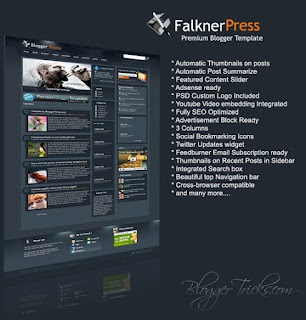
Falkner Press Magazine Style blogger template

Falkner Press Blogger Template

Another Magazine Style blogger template has been released by bloggertricks. Falkner Press Blogger Template was converted from a wordpress theme designed by CamelGraph. It's magazine style blogger template. Falkner Press has 3 columns with 2 right sidebar and much of feature is built in.

Feature :
* Auto Readmore
* Adsense Ready
* Featured Content Slideshow
* Social Bookmarking Icons
* Twitter Updates widget
* And Many more..


1. Basic Installation
2. Installation