Magazine Blogger Templates

"Free Blogger Templates"

Oct 26, 2009

Androida Magazine Blogger Template

Androida Magazine Blogger Template

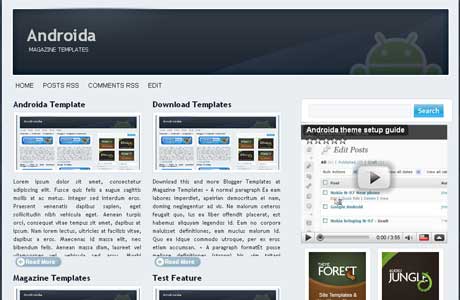
Androida Magazine Blogger Template is a light and dark blue template which is suitable for your business blog. Androida come with 3 column which the mainpost article are set by two inline, the post area is divided with two column. Androida was designed By Jinsona Design and bloggerized By Cahayabiru.com.

Basic Installation

Feed Burner ID Form
Go to Layout – Edit HTML – no need to expand widget template
Find This Word:

CahayaBirusSphere

Change it with your own Feedburner ID.

Menu Navigation
Add code below to javascript menu widget
<li><a href='#'>Title Here</a></li>

Remember to change
"#" with your own url
"Title Here" with your title

125x125 Banners
Edit sponsor widget and put code below.
<li><a href="Target link Here" rel="bookmark" title=""><img alt="" style="vertical-align:bottom;" src="Image Link Here"/></a></li>

Edit the red code.
Done and Enjoy Androida Magazine Blogger Template

Preview | Download

Oct 23, 2009

Simple Fresh Magazine Blogger Template

Simple Fresh Magazine Blogger Template

Simple Fresh is new elegant and clean design with magazine style offered for free to all blogger community by ndyteens. Simply Fresh Magazine, with 3 columns simple magazine blogger template. This template is built ads ready with 125x125 banner ads widget. Suitable for business blog. Simply Fresh is fully widgetized so you can put more widget to your template. Simple fresh is supported by new blogger feature such us Embedded Comments form, Avatar comments, and new read more or "Jump-Link" for blogger.

Basic Installation

Header 468x60 Ads
Find code below :

<a href='#'><img src='https://blogger.googleusercontent.com/img/b/R29vZ2xl/AVvXsEjZAiVFWye0uWmdyRnxe6-dN_Gqz-rLteJqKFPxw1wU3PsDFZ9cqe4BJDLsLPc09xVahjuY7MdEr-OhVGA9rCPaD8picK0nFUv3nXvcXwkMY3Zx8ax9DMgRoLZbDKLVW_0soUNn92PAHm8/s320/topbanner.gif' style='width: 468px; height: 60px;'/></a>

Change it with your own ads banner or you can put your adsense, adbrite or another advertising netwotk.

Navigation menu
Find this code:
<div id='menu'>
<div id='main_menu'><ul>
<li class='current'><a expr:href='data:blog.homepageUrl'>Home</a></li>
<li><a expr:href='data:blog.homepageUrl + &quot;feeds/posts/default&quot;'>Posts RSS</a></li>
<li><a expr:href='data:blog.homepageUrl + &quot;feeds/comments/default&quot;'>Comments RSS</a></li>
<li><a href='#'>Edit</a></li></ul>
</div>

Replace the link with yours

Subcribe Setting
Edit Subscribe widget and put code below on it.
Get Update From <b>Magazine Templates</b> On your email!
<p></p><form id="subscribe" action="http://feedburner.google.com/fb/a/mailverify" target="popupwindow" method="post" onsubmit="window.open('http://feedburner.google.com/fb/a/mailverify?uri=Your_Feed_Url', 'popupwindow', 'scrollbars=yes,width=550,height=520');return true"><input id="subbox" onfocus="if (this.value == 'Enter Your Email...') {this.value = '';}" value="Enter Your Email..." name="email" onblur="if (this.value == '') {this.value = 'Enter Your Email...';}" type="text"/><input value="Your_Feed_Url" name="uri" type="hidden"/><input value="" name="loc" type="hidden"/><input id="subbutton" value="GO" type="submit"/></form>
<br/>
<p><a href="http://feeds.feedburner.com/Your_Feed_Url"><img width="88" style="border:0" alt="" src="http://feeds.feedburner.com/~fc/Your_Feed_Url?bg=CC0000&amp;fg=444444&amp;anim=1" height="26"/></a></p>

Change Your_Feed_Url with your own feedburner id.

Sponsored Banner
Edit Sponsored Widget and put code below on it.
<center>
<!-- Ad1 start -->
<a class="ad1" href="#"><img src="https://blogger.googleusercontent.com/img/b/R29vZ2xl/AVvXsEiiwfG_GtPKgCd4jAZW_1RG_aQ-PbFlQtXPT6d_vfejYy5oUEZ5gMYmLXcZK5GA65iYUmBRFBnghOaWLeEdxc0W8Z45pbP3aGrqp_p6tiBwKuSC6DLH73wSR1y-BwOaIfH3FSVvrlFvTp7l/s1600/themeforest.jpg"/></a>
<!-- Ad2 start -->
<a class="ad2" href="#"><img src="https://blogger.googleusercontent.com/img/b/R29vZ2xl/AVvXsEiiwfG_GtPKgCd4jAZW_1RG_aQ-PbFlQtXPT6d_vfejYy5oUEZ5gMYmLXcZK5GA65iYUmBRFBnghOaWLeEdxc0W8Z45pbP3aGrqp_p6tiBwKuSC6DLH73wSR1y-BwOaIfH3FSVvrlFvTp7l/s1600/themeforest.jpg"/></a>
<!-- Ad3 start -->
<a class="ad3" href="#"><img src="https://blogger.googleusercontent.com/img/b/R29vZ2xl/AVvXsEiiwfG_GtPKgCd4jAZW_1RG_aQ-PbFlQtXPT6d_vfejYy5oUEZ5gMYmLXcZK5GA65iYUmBRFBnghOaWLeEdxc0W8Z45pbP3aGrqp_p6tiBwKuSC6DLH73wSR1y-BwOaIfH3FSVvrlFvTp7l/s1600/themeforest.jpg"/></a>
<!-- Ad4 start -->
<a class="ad4" href="#"><img src="https://blogger.googleusercontent.com/img/b/R29vZ2xl/AVvXsEiiwfG_GtPKgCd4jAZW_1RG_aQ-PbFlQtXPT6d_vfejYy5oUEZ5gMYmLXcZK5GA65iYUmBRFBnghOaWLeEdxc0W8Z45pbP3aGrqp_p6tiBwKuSC6DLH73wSR1y-BwOaIfH3FSVvrlFvTp7l/s1600/themeforest.jpg"/></a>
<div class="clearer"></div></center>

Please Change Image url and your link destination.

Done and enjoy.
Preview | Download

Oct 19, 2009

Bpress Magazine Blogger Template

Bpress Magazine Blogger Template

Bpress Mag is 3 columns magazine style blogger template desidned by akosipau and has been bloggerized by Blogger Template Place. Bpress Mag Has great feature such as, Slider Gallery, Automatic Read More, Installed Blogger Comment Avatar, and also Twitter update Feature.

Basic Installation

Slider Widget
To put or edit this widget the format code like shown below.

<ul>
<li><a href=""><img border="0" alt="Your Own Title" width="590px" src="Your Image URI" height="353px"/></a>
<div class="slidercontent">Your Own Title</div></li>

<li><a href=""><img border="0" alt="Your Own Title" width="590px" src="Your Image URI" height="353px"/></a>
<div class="slidercontent">Your Own Title</div></li>
</ul>


Twitter Update
Change YOURTWITTERID with your own ID.
<div class='twitter-content'><ul id='twitter_update_list'><li/></ul></div>
<h3 class='followme'><a href='http://twitter.com/YOURTWITTERID' style='color:#FFFFFF; '>Follow me on twitter!</a></h3>
<script src='http://twitter.com/javascripts/blogger.js' type='text/javascript'/>
<script src='http://twitter.com/statuses/user_timeline/YOURTWITTERID.json?callback=twitterCallback2&amp;count=1' type='text/javascript'/>
</div>


FeedBurner Widget
Search Code below and change the RED code to your own feedburner id
<form action='http://feedburner.google.com/fb/a/mailverify' method='post' onsubmit='window.open(&apos;http://feedburner.google.com/fb/a/mailverify?uri=YOURFEEDID&apos;, &apos;popupwindow&apos;, &apos;scrollbars=yes,width=550,height=520&apos;);return true' style='padding:0; margin:0; ' target='popupwindow'>

...............
..............
..............

<input name='uri' type='hidden' value='YOURFEEDID'/><input name='loc' type='hidden' value='en_US'/>

Enjoy New Templates.
Preview | Download

Oct 18, 2009

Get Hollywood Bowl Tickets at ACheapSeat

Get Hollywood Bowl Tickets at ACheapSeat

ACheapSeat.com is a professional ticket broker offering You all tickets for all your favourite event. Enough people have to purchase the deal for it to happen. You can buy Hollywood Bowl Tickets with very affordable price and they'll let you know with email confirmation to your email. You can always contact them incase you don't receive their confirmation which is most unlikely to happen.

Acheapseat also offered Jeff Dunham Tickets. Jeff Dunham Tickets is one of highly demands tickets now. Jeff Dunham is an American comedian who has appeared on numerous television shows. In January 2008, Jeff Dunham was voted the Top Comic in Comedy Central's Stand-Up Showdown. In January 2009, Jeff Dunham finished second. If you want to buy Jeff Dunham tickets just go to Jeff Dunham event schedule at ACheapSeat.

You can also access to many A Steady Rain tickets across the country. ACheapSeat will gladly to help, advise, and provide expertise on your A Steady Rain Theatre tickets purchase. And most of that you'll get the lowest possible prices in a nationally competitive environment. If you having a hardest time to find those ticket just head up to their website. ACheapSeat.com, everything you need will be more easy.

Oct 15, 2009

Bemagazine Blogger Template

Bemagazine Blogger Template
Bemagazine was designed and bloggerized by ipietoon. Bemagazine come with 4 columns and ads ready blogger template. Bemagazines is perfect for business blog.

1. Basic Installation

Banner Ads
Paste these code

<div id="adspot">
<!-- Ad1 start -->
<a class="ad1" href="#"><img src="https://blogger.googleusercontent.com/img/b/R29vZ2xl/AVvXsEiiwfG_GtPKgCd4jAZW_1RG_aQ-PbFlQtXPT6d_vfejYy5oUEZ5gMYmLXcZK5GA65iYUmBRFBnghOaWLeEdxc0W8Z45pbP3aGrqp_p6tiBwKuSC6DLH73wSR1y-BwOaIfH3FSVvrlFvTp7l/s1600/themeforest.jpg" /></a>
<!-- Ad2 start -->
<a class="ad2" href="#"><img src="https://blogger.googleusercontent.com/img/b/R29vZ2xl/AVvXsEiiwfG_GtPKgCd4jAZW_1RG_aQ-PbFlQtXPT6d_vfejYy5oUEZ5gMYmLXcZK5GA65iYUmBRFBnghOaWLeEdxc0W8Z45pbP3aGrqp_p6tiBwKuSC6DLH73wSR1y-BwOaIfH3FSVvrlFvTp7l/s1600/themeforest.jpg" /></a>
<!-- Ad3 start -->
<a class="ad3" href="#"><img src="https://blogger.googleusercontent.com/img/b/R29vZ2xl/AVvXsEiiwfG_GtPKgCd4jAZW_1RG_aQ-PbFlQtXPT6d_vfejYy5oUEZ5gMYmLXcZK5GA65iYUmBRFBnghOaWLeEdxc0W8Z45pbP3aGrqp_p6tiBwKuSC6DLH73wSR1y-BwOaIfH3FSVvrlFvTp7l/s1600/themeforest.jpg" /></a>
<!-- Ad4 start -->
<a class="ad4" href="#"><img src="https://blogger.googleusercontent.com/img/b/R29vZ2xl/AVvXsEiiwfG_GtPKgCd4jAZW_1RG_aQ-PbFlQtXPT6d_vfejYy5oUEZ5gMYmLXcZK5GA65iYUmBRFBnghOaWLeEdxc0W8Z45pbP3aGrqp_p6tiBwKuSC6DLH73wSR1y-BwOaIfH3FSVvrlFvTp7l/s1600/themeforest.jpg" /></a>
<div class="clearer">
</div></div>

Change "#" to Your URL ads and https://blogger.googleusercontent.com/img/b/R29vZ2xl/AVvXsEiiwfG_GtPKgCd4jAZW_1RG_aQ-PbFlQtXPT6d_vfejYy5oUEZ5gMYmLXcZK5GA65iYUmBRFBnghOaWLeEdxc0W8Z45pbP3aGrqp_p6tiBwKuSC6DLH73wSR1y-BwOaIfH3FSVvrlFvTp7l/s1600/themeforest.jpg to your own image url

Search Form
<div id='search'>
<form action='/search' id='searchform' method='get'>
<input id='s' name='q' type='text' value=''/>
<input id='searchsubmit' type='submit' value=''/>
</form>
</div>


RSS Subscribe on Post
Click on expand widget template and find code below :
<div class='subs'>
<div class='title'>Subscribe Here</div>
<center>
<form action='http://feedburner.google.com/fb/a/mailverify' id='feedform' method='post' onsubmit='window.open(&apos;http://feedburner.google.com/fb/a/mailverify?uri=bietemplates&apos;, &apos;popupwindow&apos;, &apos;scrollbars=yes,width=550,height=520&apos;);return true' target='popupwindow'>
<input class='textarea' name='email' onblur='if (this.value == &apos;&apos;) {this.value = &apos;Enter email address here&apos;;}' onfocus='if (this.value == &apos;Enter email address here&apos;) {this.value = &apos;&apos;;}' type='text' value='Enter email address here'/><br/>
<input name='uri' type='hidden' value='camelgraph'/> <input name='title' type='hidden' value='54800'/> <input name='loc' type='hidden' value='en_US'/>
</form>

<p><a href='http://feeds2.feedburner.com/bietemplates'><img alt='' height='26' src='http://feeds2.feedburner.com/~fc/bietemplates?bg=8eca2c&amp;fg=ffffff&amp;anim=1' style='border:0' width='88'/></a></p></center>
</div>

Change red text to your own feedburner ID

Enjoy New Templates.
Preview | Download

Sep 30, 2009

Corporate Theme Magazine Blogger template

Corporate Theme Magazine Blogger template

Corporate Theme is inspired by Wordpress Corporate Themes which is designed by StudioPress and Make it possible to blogger by Bloggerceria. Corporate themes come with 2 columns, slider top, right sidebar, and embedded 3 columns footer section. I've modified this template and now you don't need to upload any javascript code to your own web hosting since it's already built in. You may look the demo and download it. Enjoy.

Preview | Download

Sep 25, 2009

BloggerTube Video Gallery Blogger Template

BloggerTube Video Gallery Blogger Template
BloggerTube is the first blogger template using automatic thumbnail for video, easy post for newbie, well made design and all of that, bloggertube is FREE. BloggerTube Blogger Template was designed and bloggerized by Dante Araujo.

Features on BloggerTube :

1. Automatic embedded video on post page (only paste URL link)
2. Automatic slider for the last featured videos
3. Automatic Recent videos widget (video thumbnail)
4. Automatic Thumbnail from Youtube (only Youtube URL)
5. Page Navigation
6. Three Column Video Posts

Basic Installation

How to post a new video on BloggerTube :

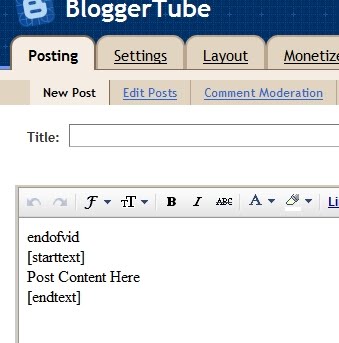
1. Go to setting >> Formatting >> Post Template and paste code below on the form and save it.

endofvid
[starttext]
Write anything here, upload pictures... Make a video description, whatever...
[endtext]


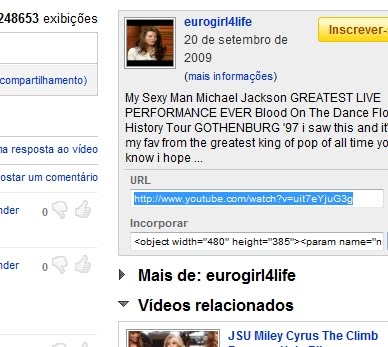
2. Go to youtube video and copy your youtube video url. Look closely to image below

Bloggertube Installation Image
3. Go to your Blogger and make your new post.


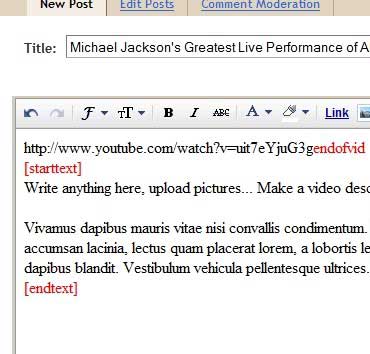
4. Your Post Should be format like this below :


5. Here is Your Post Format looks like
Your Youtube Video URLendofvid
[starttext]
Your Text description. Fill it Or leave it blank.
[endtext]


6. Install Recent Video Widget :
Just go to your Page Elements section, click to edit the HTML/Javascript Widget called "Recent Videos" and paste the following code inside:
<script style="text/javascript" src="http://blogergadgets.googlecode.com/files/dante.js"></script>
<script style="text/javascript">
var numposts = 5;
var showpostthumbnails = true;
var displaymore = true;
var displayseparator = true;
var showcommentnum = true;
var showpostdate = true;
var showpostsummary = true;
var numchars = 50;
</script>
<script src="/feeds/posts/default?orderby=published&alt=json-in-script&callback=showrecentpostswiththumbs"></script>
<div class="clear"/></div>

All done. Everything is automatic way. You just need to follow the instruction above. Look Demo below and happy download.

Preview | Download